FixYa Report Reveals Biggest Gripes With Ultrabooks From Apple, Dell, Lenovo, and More

FixYa’s Ultrabook Report finds consumers troubled with battery life on the Lenovo X1 Carbon and Vizio Thin + Light; billing the Asus Zenbook Prime as a strong competitor to the reigning Macbook Air; while consumers warn other potential buyers to steer clear of the Dell XPS 14z

SAN MATEO, CALIF. (September 20th, 2012) – Today FixYa, the leading product Q&A destination on the web, announces the release of a new report comparing consumer issues across the most popular ultrabooks. The FixYa Ultrabook Report includes the Macbook Air, Asus Zenbook Prime, Lenovo Thinkpad X1 Carbon, Dell XPS 14z, Acer Aspire Timeline Ultra M5, Vizio Thin + Light, and Lenovo IdeaPad. FixYa’s Ultrabook Report, released today, looks at these market-leading devices and pits them against each other, basing its findings on thousands of troubleshooting requests posted by consumers on its product Q&A site.

To learn more about the FixYa Ultrabook Report visit: the Ultrabook Report page.

With an increasing number of people working on-the-go and using computers for both business and personal tasks, ultrabooks have exploded in popularity. While Apple’s Macbook Air dominates the market with their pick-up-and-use mantra, and a long track record of producing high quality products, competition in the ultrabook market has become fiercer than it once was. With an explosion of choices in the market today, consumers are generally left confused, uninformed, and uncertain as to the strengths and weaknesses of each ultrabook. The FixYa Ultrabook Report seeks to provide clarity to consumers by highlighting the main troubleshooting trends across seven of the standout devices.

Below are the top five problems for each device in the FixYa Ultrabook Report, and the percentage of troubleshooting requests that fall into each problem category:

Top 5 Azus Zenbook Prime Problems:
1. Touchpad Errors – 45%
2. Keyboard Issues – 20%
3. Runs Slow – 20%
4. Heat and Noise – 10%
5. Other – 5%

Top 5 Macbook Air Problems:
1. Low Memory – 25%
2. Thermal Shutdown – 25%
3. Difficult to Repair – 20%
4. Speaker Quality – 15%
5. Other – 15%

Top 5 Lenovo Thinkpad X1 Carbon Problems:
1. Battery Life – 35%
2. Touchpad Errors – 30%
3. Poor Multitasking – 25%
4. Runs Slow – 5%
5. Other – 5%

Top 5 Dell XPS 14z Problems:
1. Wireless Card Connection – 35%
2. Poor Screen Quality – 25%
3. Heats Up Quickly – 20%
4. Lack of Support – 10%
5. Other – 10%

Top 5 Acer Aspire Timeline Ultra M5 Problems:
1. Poor Screen Quality – 35%
2. Loud Fan – 25%
3. Heat – 20%
4. Insufficient SSD – 10%
5. Other – 10%

Top 5 Vizio Thin + Light Problems:
1. Battery Life – 35%
2. Keyboard – 25%
3. Slow Performance – 20%
4. Wi-Fi Problems – 15%
5. Other – 5%

Top 5 Lenovo IdeaPad Problems:
1. Poor Screen Quality – 35%
2. Loud Fan – 30%
3. Heat – 15%
4. Insufficient SSD – 10%
5. Other – 10%

FixYa compiled its latest report and how-to troubleshooting guide by sourcing data from its 25 million users and 8 million product problems and solutions. Those interested in viewing the full report as well as crowd-sourced solutions to each device’s top issues can do so here.

“Choosing the right ultrabook can be a tricky process: with size and portability being a dominant factor for consumers, ultrabooks must balance power with issues like heat generation and build quality,” said FixYa CEO Yaniv Bensadon. “Our goal at FixYa is to unearth the strengths and weaknesses of market leading products, and to lift the veil of uncertainty for consumers. The FixYa Ultrabook Report brings the most common ultrabook problems to the forefront, while offering troubleshooting solutions, when possible, for current owners.”

FixYa brings consumers the most comprehensive solution database in the world. The FixYa Smartphone Report was generated from over 25 million users, 650,000 experts and 8 million product problems and solutions. FixYa’s unique access to crowd-sourced product Q&A from consumers grants the company transparent data that no other service can claim to provide. FixYa’s troubleshooting data comes from real-life consumer experience with products and product problems.

To learn more about the FixYa Smartphone Report, visit https://blog.fixya.com/pr/sept2012/ultrabook-report.html

To learn more about FixYa, visit www.fixya.com

About FixYa

FixYa is a community based trouble-shooting resource that provides consumer-generated, practical product tips to help consumers solve problems on 8 million products. FixYa is a place where individuals can share real world experiences and connect to provide each other practical advice. From fixing cars, to cameras, to mobile devices, FixYa empowers over 25 million monthly visitors to repair and improve upon products they already own via its website and on mobile devices around the globe. FixYa is a venture-funded company with offices in San Mateo, California.

For more information, visit www.FixYa.com, email a question via our contact page, or follow FixYa on Twitter.

Congratulations to Chris Hingee on being Expert of the Month for August 2012

FixYa is proud to congratulate Chris Hingee, also known as “Geekman”, on earning FixYa Expert of the Month honors for his work in August 2012.

A long-time top expert on the site, Chris’ ability to provide concise solutions to questions across various categories is an asset that the FixYa community appreciates immensely– not a day goes by without Chris helping someone solve a nasty product problem. His ability to offer a wide range of tips and fixes for laptops, cell phones, printers, routers, and numerous other technical devices enriches the site immensely, setting the standard for what an online tech support should be.

All of FixYa is blessed to have his dedication on our team. We couldn’t be prouder to have an Expert of this magnitude assisting users daily.

With an astonishing 25,363 solutions and a whopping 79,000 solution points glowing on his resume, Chris’ relationship with 25 million monthly users of FixYa is extremely special. Users know and understand that when they see one of their product problems solved by Chris they are well on their way to getting a quick and reliable fix.

Like all of us, Chris has his specialties. The category he enjoys the most is PC Laptops. In that realm he has provided answers for over 8,400 problems asked by FixYa users.

Other notable areas of expertise are as follows:

  • PC Laptops – 8422 solutions
  • Cellular Phones – 4036 solutions
  • Printers – 2588 solutions
  • Routers – 1956 solutions
  • Motherboards – 1701 solutions
  • PC Desktops – 1291 solutions

If you have a question about a product in one of these categories, rest assured FixYa fanatics– you are in excellent hands.

Make the jump for a quick Q&A with Chris about his experience on FixYa as an Expert and a few personal notes of interest.

Continue reading …

Getting To Know You: Scott Connely

Occasionally on the blog we will be profiling an Expert or FixYa employee so that you can get to know the people behind the scenes on more of a personal level. This week we have Scott Connely, a member of our customer service team.

Scott was born in Leicestershire, England in 1977 located in the small town of Market Harborough where he lived for a majority of his teenage years. At school Scott was very sporty and was a member of the athletics, swimming and gymnastics teams. Riding his bike was his favorite pastime as a child, and he put that to good use delivering newspapers in his neighborhood.

During his first job since leaving school, Scott earned himself a qualification in Customer Service with a work based youth program. It was here that Scott learned all he needed to know about the Customer Service industry.

At the age of 23 Scott decided it was time to broaden his horizons and took himself off to Sydney Australia on a working holiday visa. He spent a majority of the year having fun, experiencing a different culture, and meeting new people. Whilst out and about Scott met his longtime partner and stayed in Australia for 6 years. He now lives in Israel where he is working for FixYa as an Expert Support representative and has been with the company for 2 years.

Scott loves nothing more than travelling and searching for new adventures. So far he has travelled to Thailand 8 times and spent 4 ½ months travelling around India and has visited a lot of Asia and Europe. When he is not working or working out at the gym he enjoys to be in the kitchen where he cooks healthy meals. He also has a 2 ½ year old Husky aptly named Sydney.

To get to know him a little better, we asked Scott a few questions about his role at FixYa and what makes him tick.

Q: What role you play at FixYa?

I have been with FixYa for 2 years. I began working in the Customer Support department and now I assist Experts with their enquiries. I answer Experts emails regarding a range of different issues they may be having or passing on their feedback and ensuring that their voices are heard. But that’s not it – I have my thumb in a lot of pies and I like to keep myself busy with various projects that come up, for example I am working on a comparison project where I am comparing FixYa to other leading Q&A sites.

Q: What do you most like about your job in Expert support?

I like working at FixYa as we have a nice group of individuals and it’s laid back. I really enjoy customer service and being on the front line. Assisting the Experts with their range of inquiries certainly keeps me on my toes because they know a lot about the site.

Q: What do you like most about FixYa?

I think that FixYa in comparison to all of the other Q&A website’s has a lot of great features and is very aesthetically pleasing. Fixya is constantly involving and there is a lot of exciting things about to happen with FixYa. For example the FixYa Point Shop just opened and I am excited to see how it has worked for the Experts and what they think about it.  FixYa is extremely dynamic and you can never know what is around the corner.

Wireless Printing, Ink Abuse, and Paper Jams – New FixYa Report Shines Light On Biggest Customer Issues with Top Printers from HP, Epson, Canon, Samsung, and Kodak

FixYa’s report finds consumers loving the ease of the HP Photosmart and the reliability of the Samsung SCX; wishing for wireless scanning with the Epson Stylus; while warning users to steer clear of the Canon Pixma and Kodak ESP

Today FixYa, the leading product Q&A destination on the web, announces the first-ever report comparing consumer issues across all of the most popular printers including makes from HP, Epson, Canon, Kodak, and Samsung. Even with the explosion of digital media, the necessity for physical documents still exists and, naturally, printers continue to be just as frustrating and unreliable as ever. FixYa’s Printer Report, released today, looks at market-leading products and pits them against each other to help consumers make the best purchasing decision. The FixYa Printer Report based its findings on thousands of troubleshooting requests posted by consumers on its product Q&A website.

While the Samsung SCX is known for its reliability, it is an older model without many of the recent upgrades most printers offer. However, it is these newer features that have also been giving many customers the biggest headaches. The FixYa Printer Report seeks to provide an honest review to consumers by highlighting the main troubleshooting trends across five of the standout products. The FixYa Printer Report also highlights a number of other concerns among the surveyed printers:

  • While being praised for easy setup and troubleshooting, consumers are seeing a lot of wireless scanning issues with the HP Photosmart. Along with scanning issues, the Photosmart is criticized for being extremely loud, producing a “deafening racket”
  • The Epson Stylus has been heavily criticized for lacking the ability to wirelessly scan documents and for its notorious photo paper jams
  • Applauded for its reliability and price point, the Samsung SCX is an older printer that gives users with Mac OSX 10.5.3 or higher some serious difficulties

Below are the top five problems for each device in the FixYa Printer Report, and the percentage of troubleshooting requests that fall into each problem category:

Continue reading …

Takeoff Tuesday: New Thread and Product Pages

Greetings FixYa fanatics! In this week’s edition of Takeoff Tuesday we run through the improvements you’ll see when you land on a thread page to view a solution or go to a product page to check out a hot new product.

You can visit these new pages by visiting www.fixya.com and searching for a solution/product. Or you can just click here if you’re not in the browsing mood and want us to do all the work for you.

It’s what we’re here for. Happy to oblige.

But back to the task at hand. Our main goals when we designed this new thread page were as follows:

  • Provide a sleeker and more modern experience for you and 30 million other monthly FixYa users
  • Give Experts more tools at their disposal to solve questions from thread pages
  • Encourage more interaction amongst users by highlighting the comment sections
  • Provide askers and browsers a clear idea where the question stands (solved or unsolved)
  • Retain the core functionality of the FixYa experience while improving upon the sturdy infrastructure of the best product support site in the world

Right when you land on the new thread page you can just how much it hums– the layout is very similar to what we had in the past, but small housekeeping tweaks around the page improve your experience by leaps and bounds.

It’s easier to view solutions, interact with other users, and find exactly what you’re looking for. Furthermore, we’ve experienced greater interaction with the page when we rolled it out in our initial beta test for select users.

The product team’s number one goal is to always make sure the 30 million people who come to our site each month are happy with any changes we make. That’s why we test and test, listen to feedback, and test again. We’re happy that you guys are happy with the changes, and as always, invite you to reach out to us at support-at-fixya-dot-com if you have anything on your mind.

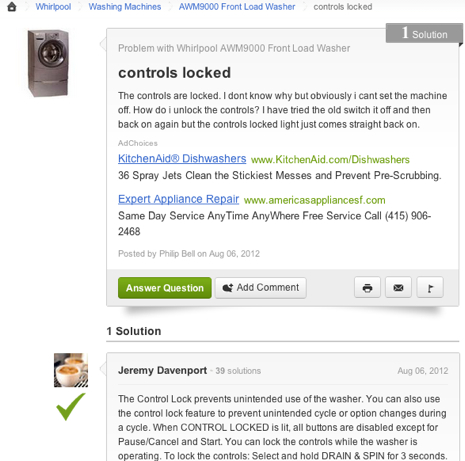
You can see an image of the new page below.

Click “Continue Reading” to see a full list of the improvements we have made to the page.

Continue reading …